RoughAnimator - animation app
WeirdHatArt & Design
4.5844.00 Reviews
- Version
- 4.25
- Installs
- 50.00K
- Age Rating
- Everyone
Screenshots
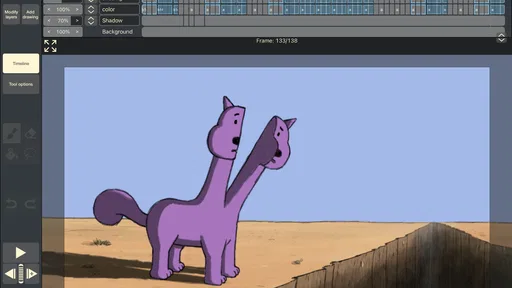
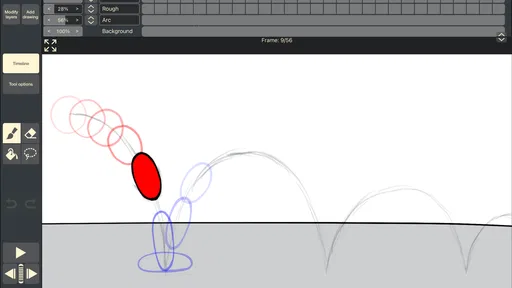
Our Review of RoughAnimator - animation app
 Analysis by Appyee
Ever wanted to unleash your inner animator but didn’t have the right tools or the time to learn complex software? Well, let me introduce you to RoughAnimator. This app is an absolute gem for anyone keen on diving into the world of animation, whether you're a beginner or a seasoned artist looking to sketch out some quick ideas.
A pocket-sized drawing room, with a specific purpose
RoughAnimator is a paid art-and-design app from WeirdHat, currently at version 4.22. Its appeal is straightforward: it gives me a place to work through drawn animation ideas without needing to sit at a desktop. That makes it useful for rough tests, expressive hand-drawn movement, and short scenes whose value is in the motion rather than polished effects.
I would not treat it as a miniature replacement for every part of a studio pipeline. The central job here is drawing animation frame by frame. If I want to build a scene around complex compositing, motion graphics, or a large collection of finishing tools, a broader desktop program may suit me better. But when I want to find out whether a character gesture reads, or whether a small visual gag works, a focused animation app is often less distracting.
Who gets the most out of it
I think it is a particularly good fit for illustrators who already enjoy drawing and want to make their sketches move. A beginner can use it to learn the basic logic of changing a drawing over time, while an experienced artist can use a compact session to test timing or pose ideas before committing to a more involved project. The same frame-by-frame approach also makes it a reasonable choice for short loops, simple character acting, and rough story moments.
It is less compelling if your main goal is to assemble finished video from many kinds of media, build elaborate visual effects, or automate movement rather than draw it. A dedicated video editor is better for editing footage and arranging a polished sequence; a motion-graphics tool is a better match for typography and shape-based animation. The important distinction is not that one approach is superior, but that RoughAnimator rewards hands-on drawing and patience with individual frames.
A practical way to keep a small project manageable
For a first exercise, I would choose one clear action—a blink, a hand wave, or a bouncing object—and keep the background still. Make the main poses readable before adding the in-between drawings. Onion skinning is useful here because it lets me compare neighboring frames, but it can also tempt me to make tiny adjustments without checking the motion as a whole. I like to pause and review the sequence regularly so I can judge the action rather than only the separate drawings.
A useful everyday scenario is catching a few spare minutes between errands to sketch a character turning toward a sound. I can rough out the key poses on a phone or tablet, then revisit the timing when I have a longer stretch of time. That kind of small, self-contained task suits the app better than trying to squeeze an ambitious, multi-scene production into fragmented sessions. Keeping each practice goal narrow makes it easier to see what is working and finish something I can actually review.
Getting Started with RoughAnimator
When I first downloaded RoughAnimator, I was honestly expecting a basic toolset, but boy, was I wrong! The app is packed with features that make it feel like a portable animation studio right in your pocket. Setting it up was a breeze. After installing it, I opened up the app, and voila—there was a blank canvas waiting for me to bring my ideas to life.
User-Friendly Interface
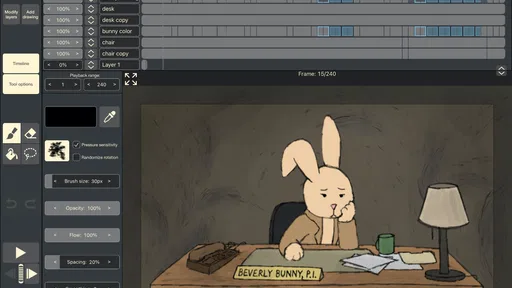
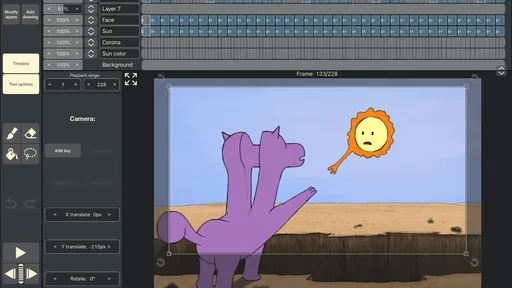
Let’s talk about the interface. It’s as intuitive as it gets. With a clean layout, all the essential tools are at your fingertips. The timeline is easy to navigate, and adding new frames is just a tap away. I found it super helpful that the app doesn’t overwhelm you with options; instead, it provides just what you need to get started and lets you explore more advanced features as you get comfortable.
Features That Stand Out
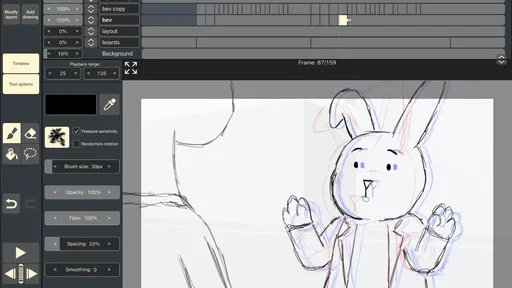
One of the first things I noticed was the app’s brush engine. You have a variety of brush types and sizes to choose from, allowing for a lot of creativity. I spent a good amount of time just experimenting with different brushes to see how they affect the animation style. The onion skinning feature is a game-changer—it lets you see the previous and next frames in semi-transparent views, making it easier to create smooth transitions.
I also loved the audio import feature. Adding sound to animations can really bring them to life, and RoughAnimator makes it simple to sync your drawings with audio clips. This is perfect for creating short films or animated sequences with dialogue or sound effects.
Timing, sound, and the value of rough passes
Audio is most helpful to me when it answers a timing question, not just when it adds polish. A short spoken line, for example, can give a scene a rhythm to draw against; I can focus on a mouth shape or reaction at the moment the sound changes. I would still begin with a rough visual pass, though. If I add sound before I know what the action needs to communicate, it is easy to spend time matching drawings to a clip that does not improve the scene.
For a more efficient workflow, I would test the movement with a few strongly different poses first, then add drawings between them only where the action feels abrupt. This is a practical trade-off: more frames can make movement feel smoother, but they also mean more drawing and more chances to lose the clarity of the original pose. A short, readable action often benefits more from deliberate spacing than from filling every gap.
Performance and Usability
Speaking of performance, the app runs smoothly without any noticeable lag, even when I was working on a project with multiple layers and frames. It’s compatible with both Android and iOS, which is a huge plus since you can switch devices and continue working on your projects seamlessly.
Working across devices without assuming too much
Being available on Android and iOS gives me flexibility about where I draw, but I would not assume that simply installing it on two devices automatically makes a project appear on both. Before relying on a mobile session as part of a bigger workflow, I would check how the app handles project transfer and keep a deliberate backup routine. That small bit of preparation matters more than it sounds: a drawing app becomes much less convenient if the only copy of a scene is stranded on the device where I started it.
Device choice also affects comfort. A phone is handy for a quick pose test, but a larger screen gives my hand more room for controlled lines and makes it easier to inspect a crowded timeline. If I expect to spend a long session refining drawings, I would reach for a tablet where possible; if I only have a phone, I would keep the canvas work simple and save detailed cleanup for later.
What the current version tells me—and what it does not
The app first appeared on October 15, 2014, and its present version is 4.22. That history tells me it has had a long life as a mobile animation tool, but a version number alone is not a changelog. I would not infer a particular new brush, export option, or workflow improvement from it. For someone choosing it now, the more useful question is whether its current frame-by-frame approach matches the way they want to animate.
That distinction matters to existing users too. If you already have a comfortable routine, I would judge any change by whether it makes drawing, reviewing, or moving a project between devices more dependable—not by the number attached to a release. For newcomers, the best way to assess fit is to make a tiny test scene: one action, a few poses, and a quick playback. That reveals more about the feel of the timeline and drawing process than a long list of feature names ever could.
Creative Freedom
What really sets RoughAnimator apart is the level of creative freedom it offers. It doesn’t pigeonhole you into a specific style or workflow. Whether you want to create a detailed animation or just scribble out a rough idea, the app adapts to your needs. This flexibility is invaluable, especially for someone like me who likes to experiment with different animation techniques.
Where the hand-drawn approach is a strength—and a limit
Compared with general drawing apps, a timeline and neighboring-frame view make this a more natural place to plan movement rather than produce a sequence of unrelated pictures. Compared with full desktop animation suites, the mobile focus is convenient, but it is not where I would expect the same breadth of production and finishing controls. The trade-off is clear: less friction when inspiration arrives, in exchange for a workflow centered on drawing each moment yourself.
There is also a learning curve hidden inside the apparent simplicity. Drawing one frame is familiar; making a sequence feel intentional takes practice with pose, spacing, and timing. I would not buy it expecting the app to animate for me or turn a rough sketch into finished motion automatically. Its value is that it gives me a place to make those decisions, see the results, and revise them.
Cost, audience, and a sensible first project
RoughAnimator costs $7.99, so I would treat it as a deliberate purchase rather than a casual free doodle app. The price makes more sense if I expect to return to hand-drawn animation and want a dedicated tool on a mobile device. If I only want to experiment once, or mainly need to edit ordinary video, I would start with a different option that better matches that limited task.
It has an Everyone content rating, and the audience spans curious beginners through artists who already understand drawing. The app’s average rating is 4.4 from around 3.1 thousand ratings, with 779 written reviews and over 50 thousand installs. Those figures suggest an established audience, but they cannot tell me whether its drawing style or frame-by-frame workflow will suit my own habits. A short, focused test is still the fairest way to decide.
Final Thoughts
In conclusion, if you’ve ever had the slightest itch to animate, RoughAnimator is worth checking out. It’s a powerful yet user-friendly tool that caters to all skill levels. The app allows you to explore your creativity without the complexity that often comes with professional animation software. Plus, being able to animate anywhere, anytime is incredibly liberating. So go ahead, give it a whirl, and let your imagination run wild!
My recommendation
I would recommend it most to someone who likes drawing and wants a practical way to study movement in small, manageable scenes. It is a less convincing choice for people who need a complete finishing pipeline, prefer automated motion, or are unsure they will use a paid animation app more than once. For me, the best reason to choose it is the freedom to test a drawn idea wherever I have a little time—and the best reason to pause is knowing that every frame still asks for an artist’s attention.
Verdict
Strengths of RoughAnimator - animation app
- Intuitive interface for beginners.
- Supports frame-by-frame animation.
- Customizable brushes and tools.
- Exports to various formats.
- Affordable one-time purchase.
Limitations of RoughAnimator - animation app
- Limited 3D animation capabilities.
- No cloud storage integration.
- Occasional performance lags.
- Requires manual frame alignment.
- Basic audio support only.
Similar Picks in This Category
View All
Canva: AI Photo & Video Editor
Canva4.8

PENUP – Drawing-sharing SNS
Samsung Electronics Co., Ltd.4.5

Crafto
Kutumb App4.6

Sketchbook
Sketchbook4.1

ibis Paint X
ibis inc.4.5

Adobe Express: AI Photo, Video
Adobe4.6
Frequently Asked Questions
What is RoughAnimator and what can I create with it?
RoughAnimator is a powerful animation app designed for both beginners and professionals to create hand-drawn animations. Users can craft frame-by-frame animations for various purposes, such as short films, GIFs, or even intricate animations for mobile games. The app provides a range of tools to bring your creative visions to life.
Is RoughAnimator suitable for beginners in animation?
Yes, RoughAnimator is beginner-friendly while also offering advanced features for experienced animators. The intuitive interface and comprehensive tutorials make it easy for newcomers to start creating animations. The app provides a seamless learning curve from basic sketches to complex animations, catering to users with different skill levels.
On which platforms is RoughAnimator available, and how do I download it?
RoughAnimator is available for both Android and iOS devices. You can download it from the Google Play Store for Android or the Apple App Store for iOS. Simply search for 'RoughAnimator' and follow the download instructions to install it on your device.
What features does RoughAnimator offer for creating animations?
RoughAnimator offers a wide array of features, including onion skinning, layers, customizable brushes, and import options for audio and video. You can export your animations in various formats, such as GIF or video. The intuitive timeline and precision tools help in crafting detailed animations efficiently.
Are there any in-app purchases or subscriptions required for RoughAnimator?
RoughAnimator is a one-time purchase app, meaning you pay once to access all its features without recurring subscriptions. While there are no hidden fees, additional content or updates may occasionally be available for purchase. This transparent pricing model ensures you have full access upon purchase.
